Create a Chatbot Script to Attract Customers Automatically
Send Automatic Greetings: When a visitor visits the website, the chatbot will immediately send a welcome message, for example: “Hello! On the occasion of March 8, we have a special offer for women: 50% discount on skin and hair care products!”
Subiz supports automatic greeting settings for gift suggestions, promotion notifications, and instant order support.
24/7 Consultation – Flexible Live Chat: You can use Chatbots as online assistants, ready to respond to customers as soon as they send a message, at any time. Chatbots not only respond automatically but also intelligently navigate the conversation with the right suggestions and pass them on to consultants when necessary. This helps channel customers and optimize support processes.
Instructions for creating a Chatbot
Step 1: Create a Bot
- In Dashboard, hover over the top right corner of the screen and click Settings (gear image).
- Click to select Bots in the CONVERSATIONS section in the left vertical column.
- Move the cursor to the right corner of the screen and select Create Bot. Click “Bot greets customers”, select Use.
Step 2. Design the Bot scenario
Bot scripts are designed around what-if conditions. If certain conditions are met, the bot will perform certain actions. For example, if a visitor visits the website during business hours, the bot will send a greeting message. If the customer doesn’t have a phone number, the bot will ask for the customer’s phone number. Below is an example scenario:
Step 3. Set up advanced conditions for the bot
- Edit the bot name and image displayed when texting with customers. Subiz recommends that you use the name of your business or consultant for added professionalism.
- Job descriptions help classify with other Bots.
- Select the conditions when the Bot runs? Select Customers who sent messages or visitors who viewed the Website depending on your intended use.
When a customer sees a product but hasn’t bought it, what do you do? Letting them leave the page without taking any action is a waste!
Instead, leverage smart Popups to retain customers. For example, when they show signs of leaving the page, a Popup appears with the message: “Do you need help choosing a gift for March 8th? Don’t miss out on 50% off today!”
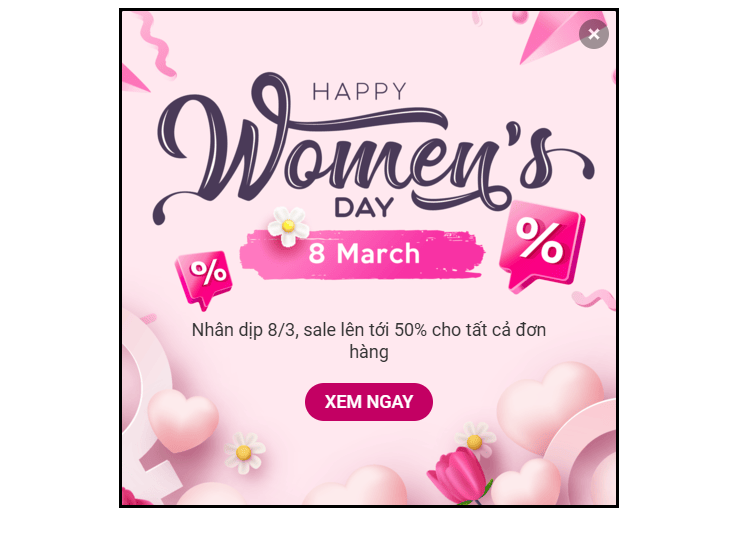
This timely message can make customers reconsider and make a purchasing decision rather than leaving immediately.
Why should you use Popup Subiz? Subiz popups do not interfere with the customer experience but are only displayed when:
- The customer intends to leave the page
- Has been active on the website for a certain period of time
- No action for a while
Popups can be used for various purposes such as: Advertising/Promotions, congratulations, related product suggestions, asking for customer information, inviting chat, etc.
Using Popups correctly will help you increase engagement, reduce page bounce rates and optimize conversions on this occasion of March 8th.
How to create a Popup on Subiz:
Subiz updates many lively Pop Up templates, which you can easily install on your website in just a few basic steps:
- Step 1: Access Subiz Settings > select popup
- Step 2: Select “Create new” > select a suitable popup template.
- Step 3: Edit the popup content as needed
- Step 4: Click “Publish”
Build effective relationships with customers through bulk shipping campaigns
Bots can only send text messages when customers have visited your website. So how do you reach customers who haven’t visited yet?
If you have a customer’s phone number, Zalo, or email, take advantage of it now by creating a campaign send in large quantities!
Amazing benefits:
- Send the same message or email to multiple customers in just a few steps.
- Personalize by automatically entering guest names, making messages more welcoming.
- Increase engagement, retain customers and promote conversions, especially next March 8!
How to set up bulk shipping on Subiz:
- Step 1: Go to Subiz > Open Bulk Shipping Arrangements on the colored square button on the toolbar.
- Step 2: Select the “Create campaign” button.
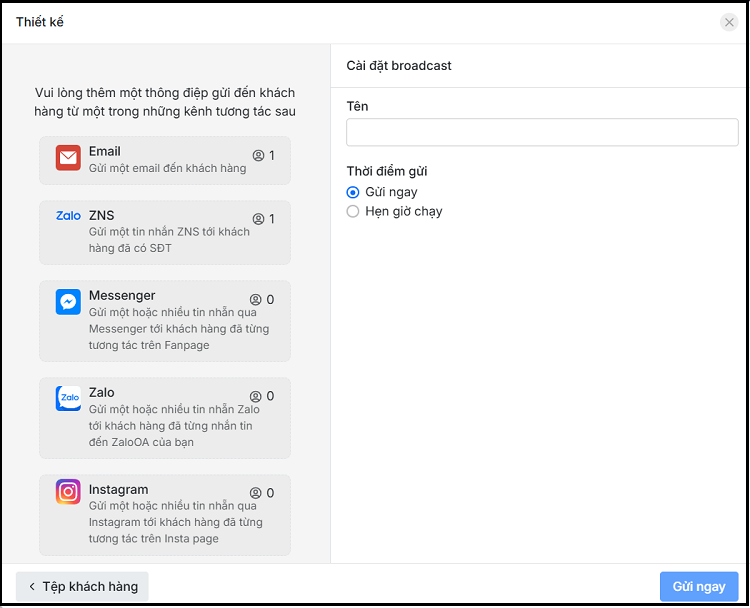
- Step 3: Select the objects on which to run the campaign in one of two ways: “Select an existing customer file in Subiz” or “Select Import from file”
- Step 4: Choose a campaign design
- Step 5: Select the desired channel (Email, Zalo, Messenger,..) and send the time immediately after creation or set a timer to run.
- Step 6: Write a message and send it.
Subiz not only helps you stay connected with customers this March 8, but also optimizes work processes, improves business efficiency, and builds customer goodwill through smart features and automation. For support, contact:
PakarPBN
A Private Blog Network (PBN) is a collection of websites that are controlled by a single individual or organization and used primarily to build backlinks to a “money site” in order to influence its ranking in search engines such as Google. The core idea behind a PBN is based on the importance of backlinks in Google’s ranking algorithm. Since Google views backlinks as signals of authority and trust, some website owners attempt to artificially create these signals through a controlled network of sites.
In a typical PBN setup, the owner acquires expired or aged domains that already have existing authority, backlinks, and history. These domains are rebuilt with new content and hosted separately, often using different IP addresses, hosting providers, themes, and ownership details to make them appear unrelated. Within the content published on these sites, links are strategically placed that point to the main website the owner wants to rank higher. By doing this, the owner attempts to pass link equity (also known as “link juice”) from the PBN sites to the target website.
The purpose of a PBN is to give the impression that the target website is naturally earning links from multiple independent sources. If done effectively, this can temporarily improve keyword rankings, increase organic visibility, and drive more traffic from search results.